
Choose your selling mode and money rules
Multi-VendorChange the marketplace selling mode safely with its preview, set the payout schedule, seller refund limit, provider fees, chargebacks and fulfilment.
In the admin: SettingsPayments
On this page
In a marketplace, Settings > Payments holds two cards that a single store does not have: Selling mode, which decides how money moves between customers, sellers and you, and Money rules, which decide how sellers are paid. Use this article when you set up your marketplace, or when you move to another mode. To understand the modes first, read Selling modes and money flows.
The Online payments and Offline methods cards on the same screen work as in any shop. See the Money and tax section for connecting Stripe or PayPal and for bank transfer.
Change the selling mode
The Selling mode card shows the mode in force at the top ("Now: ...") and the five modes as cards.
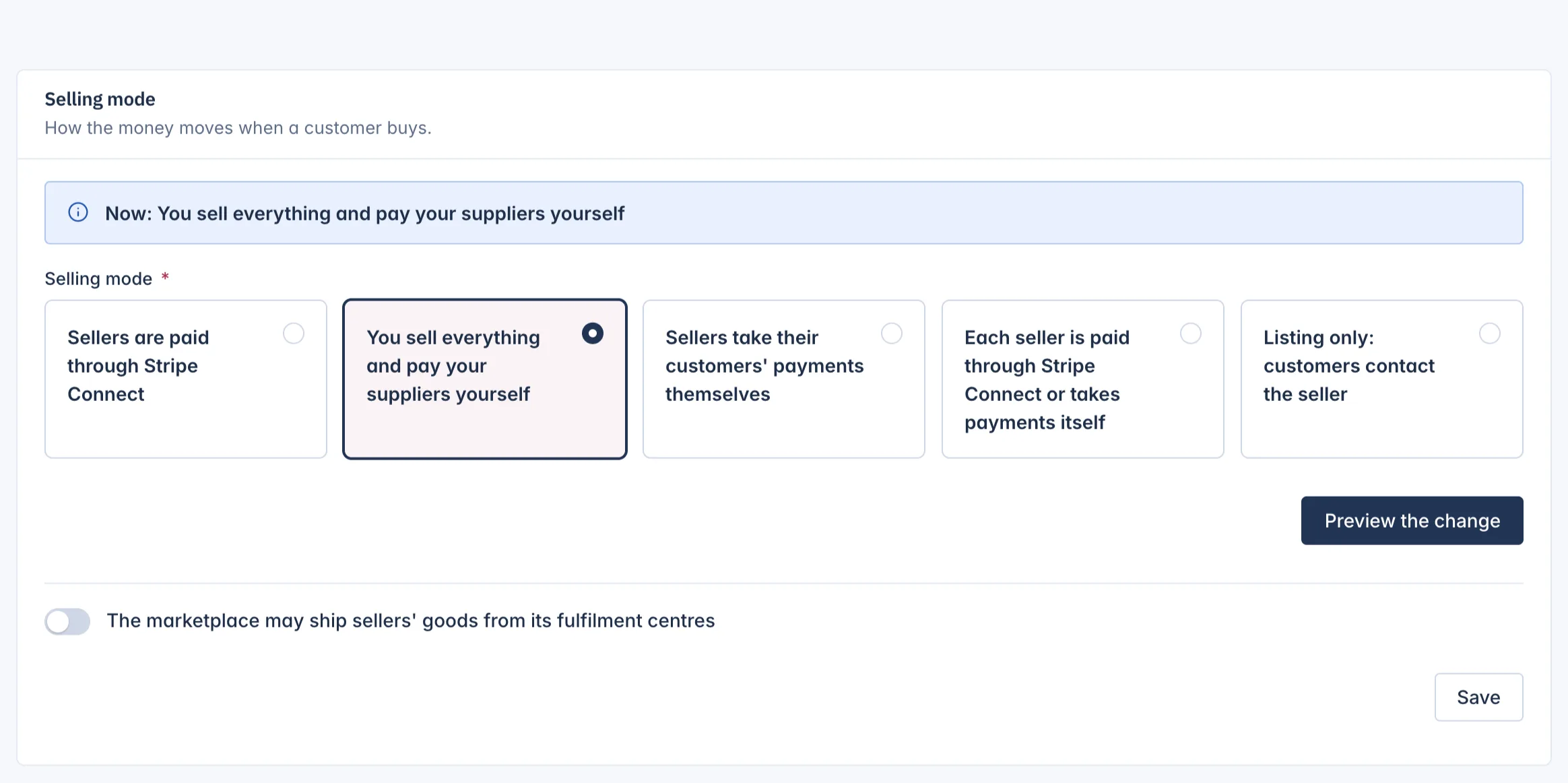
- Go to Settings > Payments and scroll to Selling mode.
- Pick the new mode.
- Press Preview the change. Nothing is changed yet.
- Read the preview page. It shows the change ("From ... to ..."), and then either "Every seller is ready for the new mode." or a list of Sellers not ready, each with What it still needs.
- Press Confirm the change, or Back to leave things as they are.
What to know before you confirm:
- Sellers not ready stop selling. Their products stay visible but cannot be bought until they finish their set-up for the new mode, for example connecting a Stripe account in Split mode, or giving their supplier details in Reseller mode.
- Listing only ends subscriptions. The preview counts the running subscriptions that end at the next hourly check, because that mode has no checkout.
- Customers still paying block the change. While orders are waiting for their payment to finish, the change is refused with the time you can try again.
- Your plan must include the mode. A mode your IXXO Cart plan does not include is refused.
- Existing orders keep their mode. Only new orders use the new one.
- Payment providers follow the mode. In Split mode a PayPal connection stays listed but shows that the mode cannot use it, and the Online payments card explains why.
Changing the mode needs the right to manage settlement, which the Owner and Administrator roles have. Others with the right to view it see the mode in force but no choice.
Ship sellers' goods from your fulfilment centres
Under the modes is the switch The marketplace may ship sellers' goods from its fulfilment centres. Switch it on, then press Save, when you hold sellers' stock in your own warehouses and ship it for them. You then choose per product, in its Stock and shipping tab under Who ships: The seller, The marketplace, or As the shop sets it for this seller.
Shipping by the marketplace also needs at least one active fulfilment centre. It is not available in Direct mode, nor for direct sellers in Mixed mode. In Split mode you may charge sellers a fulfilment fee with a commission rule of the kind Fulfilment fee; see Commission rules.
Set the money rules
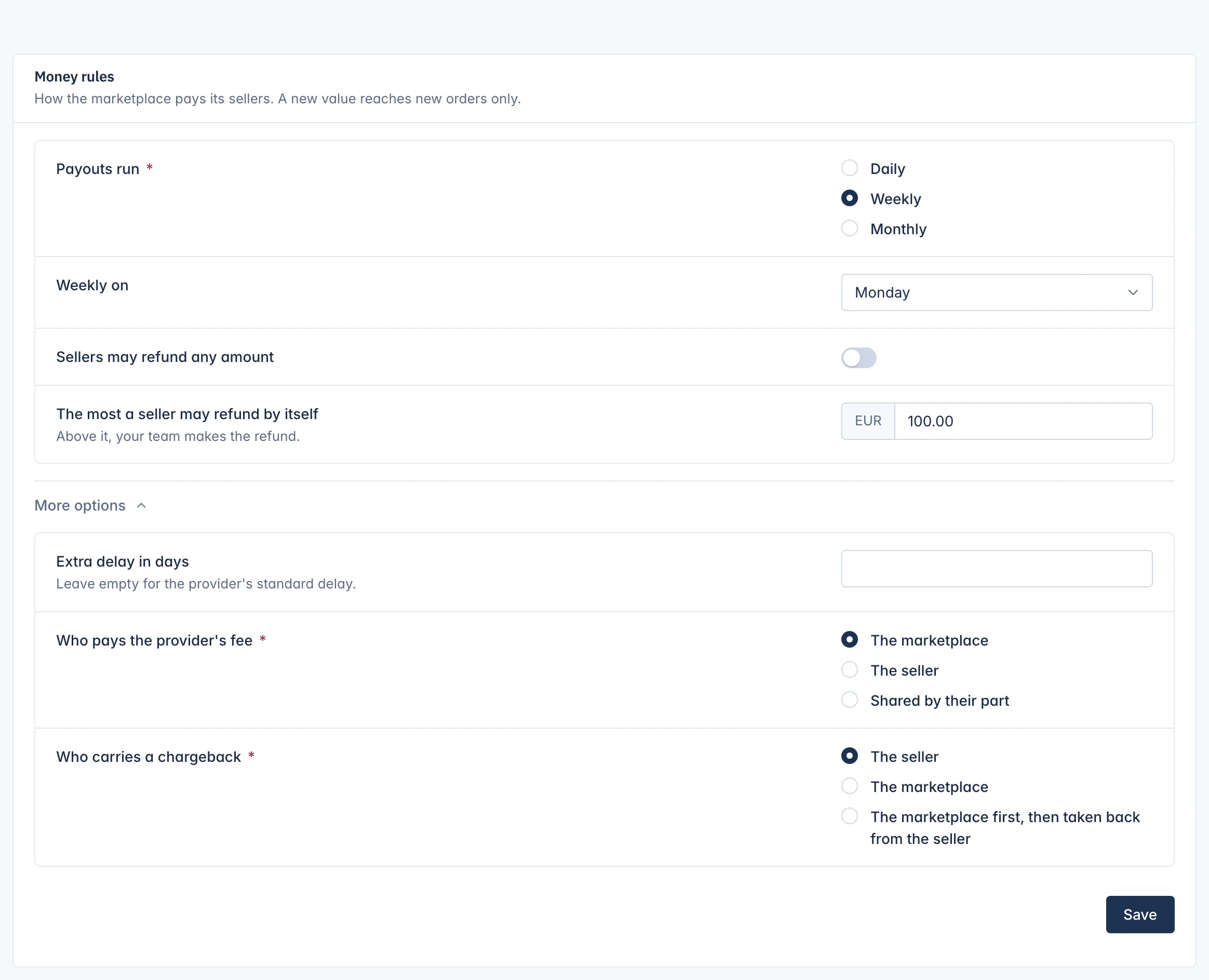
The Money rules card says how the marketplace pays its sellers. A new value reaches new orders only.
| Setting | What it does |
|---|---|
| Payouts run | How often sellers paid through your Stripe Connect platform are paid out: Daily, Weekly or Monthly. One schedule for every such seller. |
| Weekly on | The weekday of a weekly payout (Monday by default). |
| Monthly on day | The day of a monthly payout. A shorter month pays on its last day. |
| Sellers may refund any amount | Switch on to let sellers refund any amount by themselves. |
| The most a seller may refund by itself | Shown while the switch above is off (€100 by default). Above it, your team makes the refund. |
Under More options:
| Setting | What it does |
|---|---|
| Extra delay in days | Days the payment provider holds each payment before it can be paid out. Leave empty for the provider's standard delay. It cannot be longer than the provider allows. |
| Who pays the provider's fee | The marketplace (default), The seller, or Shared by their part of the payment. |
| Who carries a chargeback | For Split mode and connected sellers in Mixed: The seller (default, taken back from the seller's account at once), The marketplace, or The marketplace first, then taken back from the seller from its later transfers. |
Press Save to keep the changes.
Related
Updated 13 November 2026